


Continuous Localization for Games and Software
Continuous Localization for Games and Software
A new build is ready. UI text changed. A feature name was updated. Another content batch is already on the way.
If localization only starts once everything else is finished, these small changes pile up into one large handoff at the end of the release cycle.
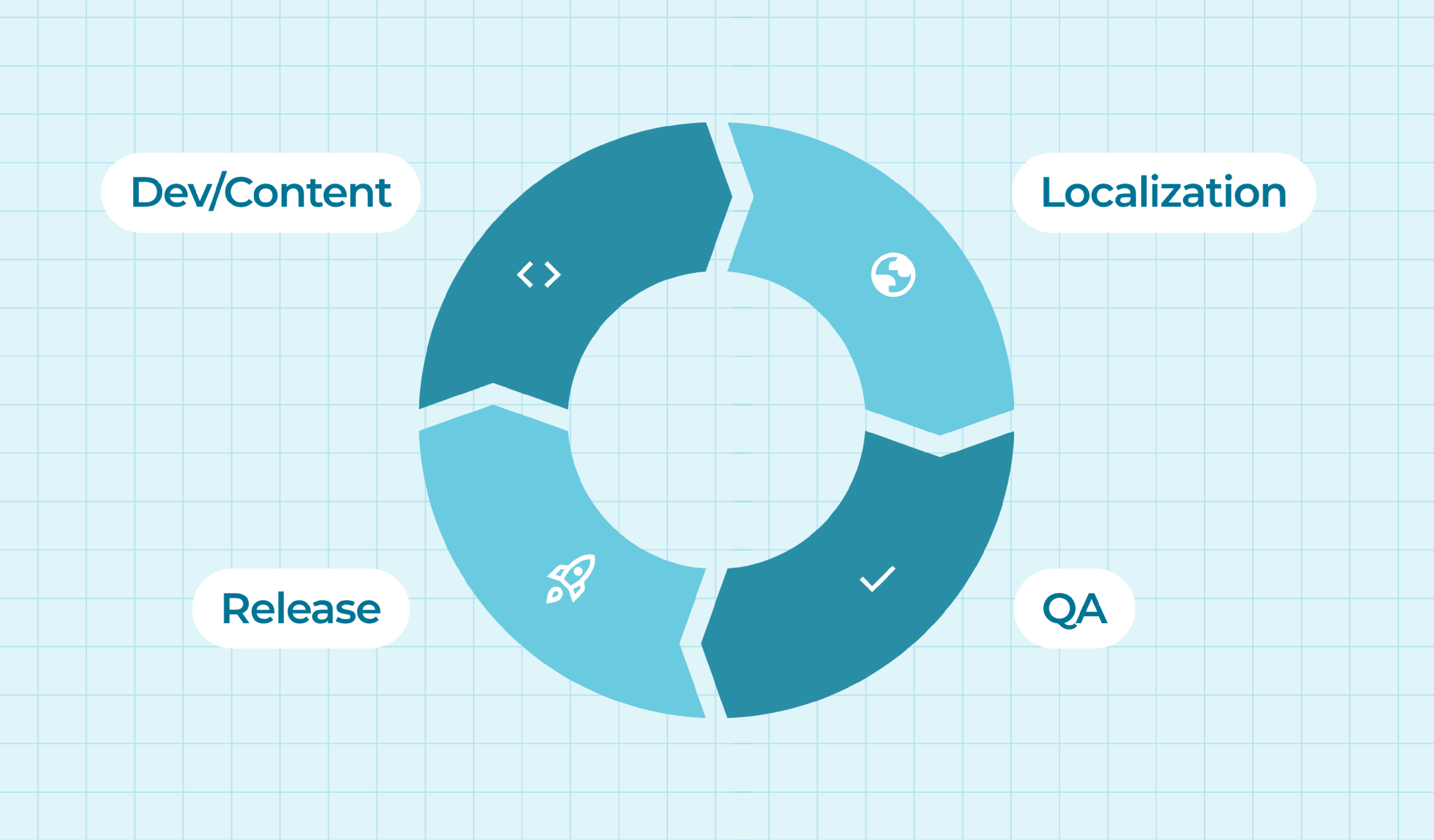
Continuous localization takes a different approach. Localization becomes part of the regular development workflow instead of a separate stage that starts after everything else wraps up. That makes releases smoother for developers, localization teams and linguists, especially when content changes often.
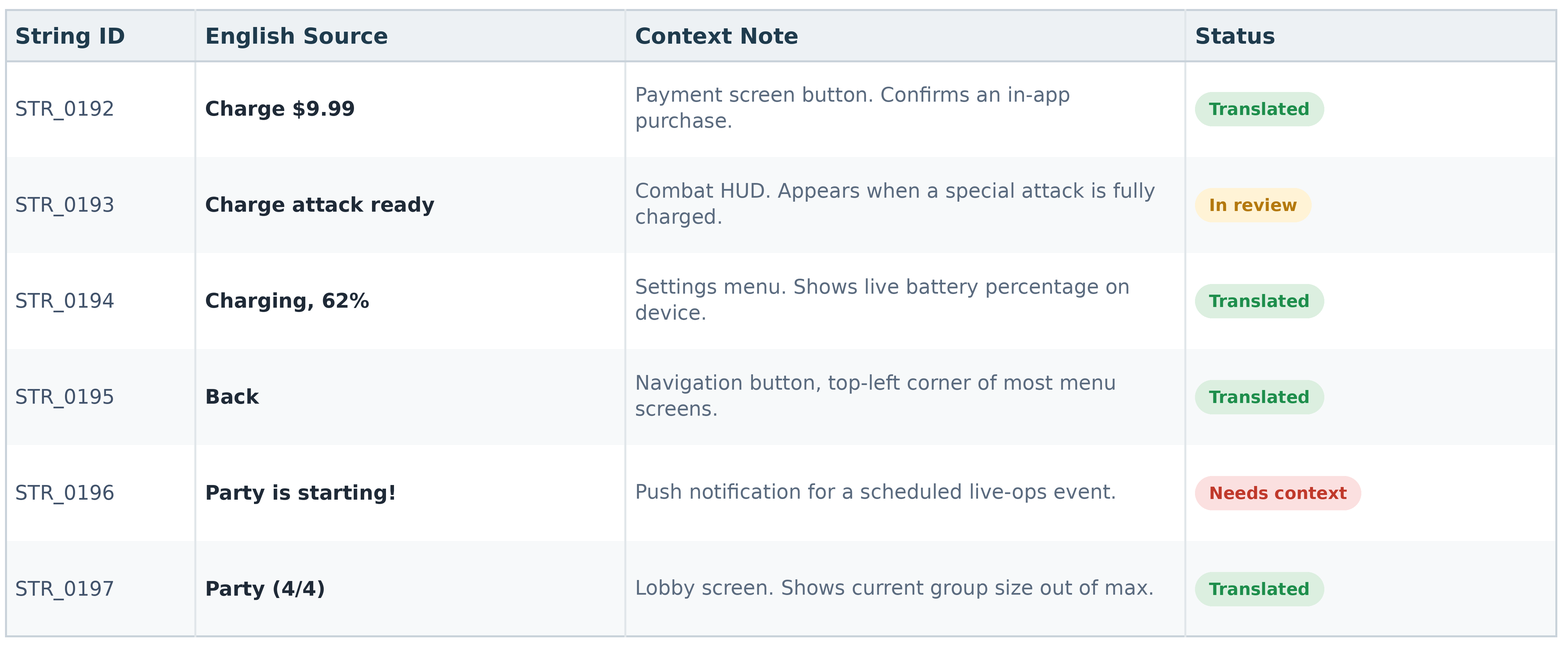
[SUGGESTED IMAGE: a real screenshot of a string table (Excel or Google Sheet) with an ID column, source text column, and a context/notes column filled in. This replaces the abstract “loop” diagram and shows readers what a batch actually looks like.]
What is continuous localization?
Continuous localization is a process where new or updated content moves into translation regularly, in step with development, instead of waiting for one large batch at the end.
A mobile game running weekly live-ops events works differently from a software company shipping a handful of releases a month, and the exact workflow looks different for each. The idea stays the same: keep localization close to the way content actually gets created.
Why teams use continuous localization
For most game and software teams, content rarely stays still for long. New dialogue, UI updates, live events, release notes and product features can all show up in the same month.
A continuous workflow spreads that work across smaller batches, which helps:
- keep translations close to the latest source content
- catch terminology or context issues earlier
- reduce large, last-minute handoffs
- keep translators familiar with recurring content
- align localization with regular release cycles
Not every string needs to move instantly. The goal is a workflow where localization happens regularly, not one large task at the end.
How continuous localization works
A typical workflow starts as soon as new or changed content is ready for localization.
1. New content is identified
The workflow needs to know what changed first, whether that’s a new set of UI strings, dialogue from the latest build, updated documentation, or a new feature description. Good integrations help teams avoid sending the same content twice.
2. A batch is prepared
New content moves into the localization workflow as a batch. This is also where context becomes critical.
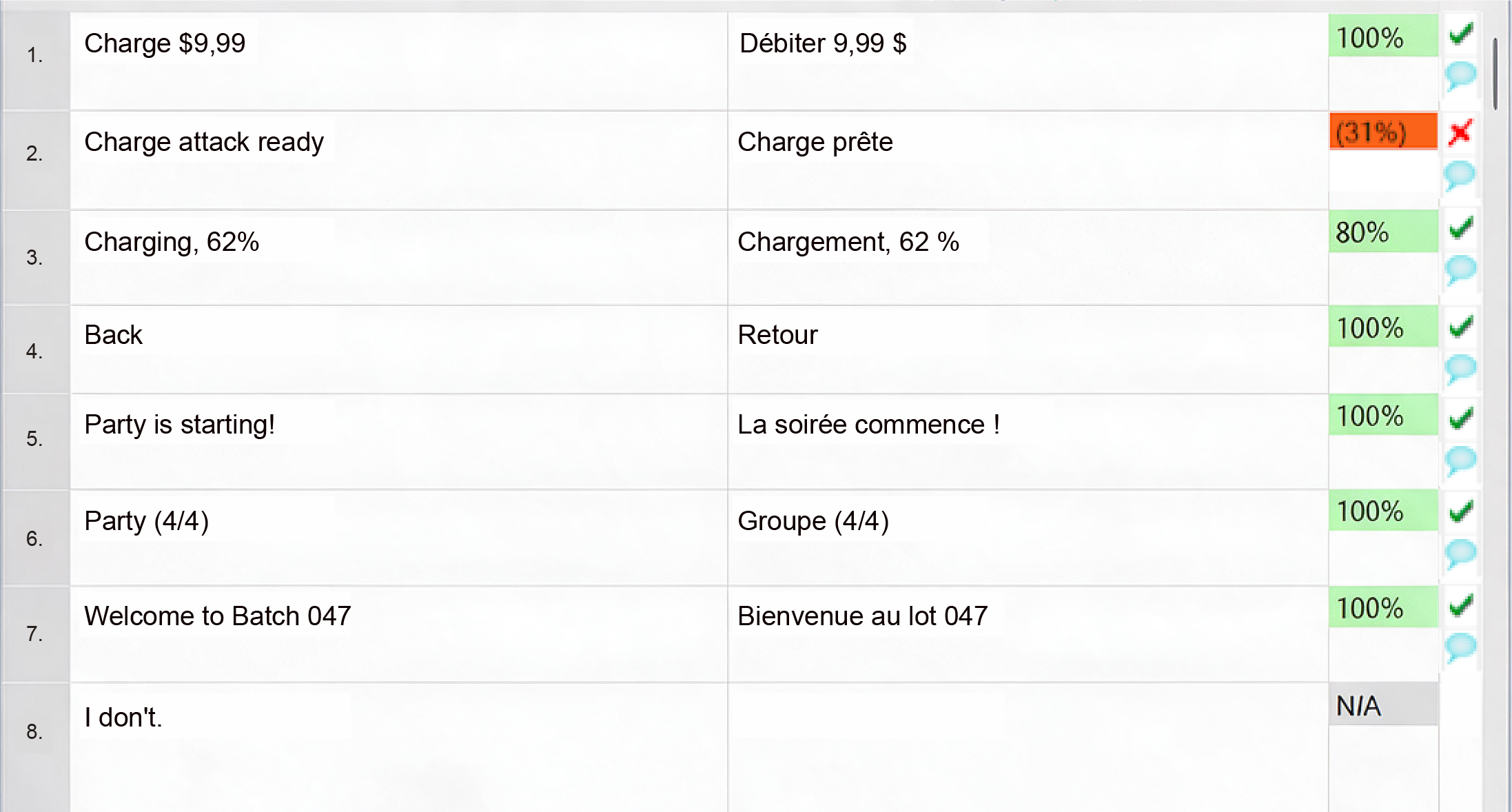
Take the string “Charge.” On a payment screen, it needs to read as an instruction to pay, something like “Charge $9.99.” In a combat ability, it means building up power for an attack, closer to “Charge attack ready.” In a device settings menu, it refers to battery level, as in “Charging, 62%.” Three different translations from one English word, and a linguist working without context has no way to know which one is correct.
Screenshots, character notes, glossaries, style guides and previous translations all help linguists pick the right meaning before they start typing.
As a rough guide, batches under about 2,000 words can usually move through the workflow as a single unit. Above that, splitting content into smaller batches makes it easier to run quality checks along the way instead of catching problems only at the end.
Most teams don’t need to change their existing tools to work this way. Content can come in as JSON, XML, Excel, Google Sheets, or directly from a CAT tool like memoQ. What matters is that the format carries enough context alongside the text.
3. Translation begins
The batch is translated using whichever setup fits the content: human translation, AI translation with human proofreading, or another combination based on quality needs, content type and release schedule.
Once a project is set up, with references shared and open questions answered, a team can typically move through 2,000 to 2,500 words per day. When AI translation is part of the mix, that speed only holds up if there’s a clear process behind it: defined style rules, AI instructions built for the project, and enough context fed in so the output already sounds right before a linguist reviews it.
Consistency matters most here. A CAT tool with a shared translation memory keeps the same terms, tone and prior translations available to every linguist on the project, whether it’s batch one or batch fifty.
4. Quality checks run
Quality assurance happens at more than one point in the workflow. Automated checks catch missing translations, inconsistent terminology, character limits and formatting problems. Human review, including linguistic QA, covers what automation can’t: tone, dialogue, cultural fit and natural phrasing.
5. Localized content moves back into production
Once a batch is approved, the localized content returns to the development or content workflow, and the next batch follows the same process. Over time, teams refine terminology, instructions, QA rules and integrations based on what each batch teaches them.
[SUGGESTED IMAGE: a real screenshot of a CAT tool interface (memoQ or similar) with a batch open, showing the source/target columns and a translation memory match highlighted. This replaces the abstract before/after comparison diagram.]
Continuous localization is more than automation
Automation is often part of continuous localization, but automation alone doesn’t make a good process.
Moving files automatically from one system to another saves time. It can’t decide whether a joke lands in Japanese or whether a character suddenly sounds different in German. Those calls still need a person with context and judgment.
A useful way to split the work: automation handles repeatable movement, and people handle decisions that need judgment. Where that line sits depends on the content.
Context matters more when batches move faster
Smaller batches move quickly, which is the point, but they can also arrive with less obvious context.
Say a linguist receives two strings on their own: “Back” and “Party.” In a menu, “Back” is a navigation button. In a war game, it could describe a character’s injury, as in “watch his back.” “Party” might mean a group of adventurers in an RPG, a live-ops event on the calendar, or a marketing push for a launch celebration. None of these meanings are obvious from the string alone.
This is why context needs to travel with the content instead of getting added later. Useful context includes:
- screenshots
- character information
- feature descriptions
- approved terminology
- style guides
- previous translations
- character limits
- notes from developers or localization managers
The goal isn’t to document every possible detail. It’s to give translators enough to make a good call without guessing.
Continuous localization for games
Games are a natural fit for continuous localization because content keeps changing well after launch, especially for mobile titles on iOS and Android running regular live-ops, and live-service games on Steam and console shipping seasonal content.
Live events, new characters, balance changes, seasonal content, DLC, UI updates and store descriptions can all arrive as separate batches. A continuous workflow keeps localization connected to those updates instead of waiting for one large content drop.
It also helps with consistency over time. If a character shows up across ten different batches, translators need the same voice, terminology and prior dialogue every time, which makes localization management just as important as the translation itself. See our portfolio for examples of how this plays out on real titles.

Continuous localization for software
Software teams face a similar challenge with different content. A release might include new UI strings, feature names, onboarding text, help content, notifications and documentation, whether the product is a mobile app, a web dashboard, or a SaaS platform shipping updates every sprint.
If product development already runs on regular release cycles, localization can connect to those cycles too. Some teams wire this up through CI/CD integrations that send new or changed strings into the localization workflow automatically. Others get by with a simpler scheduled batch process. Neither is more correct. The right setup matches how the team already works.
What you need to make it work
A complicated localization stack isn’t the starting requirement. A few things matter more.
Clear ownership. Someone should know when content is ready, who reviews it, and when localized content can move forward, whether that’s a localization manager, producer, or product manager.
Reliable context. Linguists need more than isolated strings. Glossaries, screenshots, references and style guidance keep smaller batches easier to understand and translations consistent.
A repeatable workflow. Each new batch shouldn’t require rebuilding the process from scratch. Localization platforms and integrations help here, though they still handle repeatable movement rather than the judgment calls above.
Quality checks. Fast movement only helps if quality has a place in the workflow: automated QA, linguistic review, LQA, or some combination.
[SUGGESTED IMAGE: a real screenshot of an in-game UI (a menu or dialogue screen from a title you’ve localized) with two language versions side by side. This replaces the abstract four-pillars diagram.]
Common problems to watch for
One common mistake is automating file movement before the localization process itself is clear, which just moves confusion faster.
Another is sending content without enough context. Small batches are easy to process but hard to understand if translators can’t see where the text appears.
It also helps to avoid treating every content type the same way. A short system notification, character dialogue, marketing copy and legal text need different levels of review. Continuous localization should make the workflow more flexible, not force every string through the same path.
Start small
Rebuilding an entire localization process at once is rarely necessary. It’s usually easier to start with one content type, one workflow, or a small set of languages.
Recurring UI updates are a good starting point. See how smaller batches affect handoffs, context and review, then connect more content types or add automation once the process feels stable.
This also gives the team time to see what actually helps. Some steps benefit from automation, and others still work better with a quick human check.
A good workflow gets better over time
Continuous localization is about making localization part of the way content already moves through your team, not just about doing everything faster.
As more batches go through the workflow, glossaries get sharper, instructions get clearer, QA rules get tighter, and linguists get better context. Each batch tends to get a little easier than the one before it.
For teams that keep shipping new content, that compounding improvement usually matters more than trying to perfect one huge localization handoff at the end.
Frequently asked questions
Is continuous localization more expensive than one large handoff?
Not for the same total word count. Cost is driven by volume and complexity, not by how many batches that volume gets split into. The one thing to watch is batching too aggressively: sending a handful of strings at a time adds review and setup overhead without much benefit, so batches still need to be a sensible size.
What’s the typical turnaround time for a batch?
Once a project is set up with context and reference materials ready, a team typically translates 2,000 to 2,500 words per day. Smaller batches often turn around within a day or two. If a request needs extra scoping first, expect a quote within 24 to 48 hours.
How do you keep terminology and tone consistent across many small batches?
Translation memory and a shared glossary, kept current as the project grows, so every batch pulls from the same approved terms and past translations. Keeping the same translator or team on a title over time also helps voice and tone stay consistent from batch one through batch fifty.
Which tools and file formats does this work with?
Most projects come in as JSON, XML, Excel, Google Sheets, or directly from a CAT tool like memoQ. There’s usually no need to change existing tooling to start working continuously. What matters more is making sure context travels with the file, not the format itself.